 how-to
QuickBooks Setup for Small Business: A 2026 Guide
Table of Contents
- What to Gather Before Your QuickBooks Setup
- QuickBooks Chart of Accounts Setup
- QuickBooks Tax Settings for New York Businesses
- How to Reconcile Bank Accounts in QuickBooks
- When to Get Help With QuickBooks Setup
- Frequently Asked Questions
Last Updated: September 16, 2026
What to Gather Before Your QuickBooks Setup
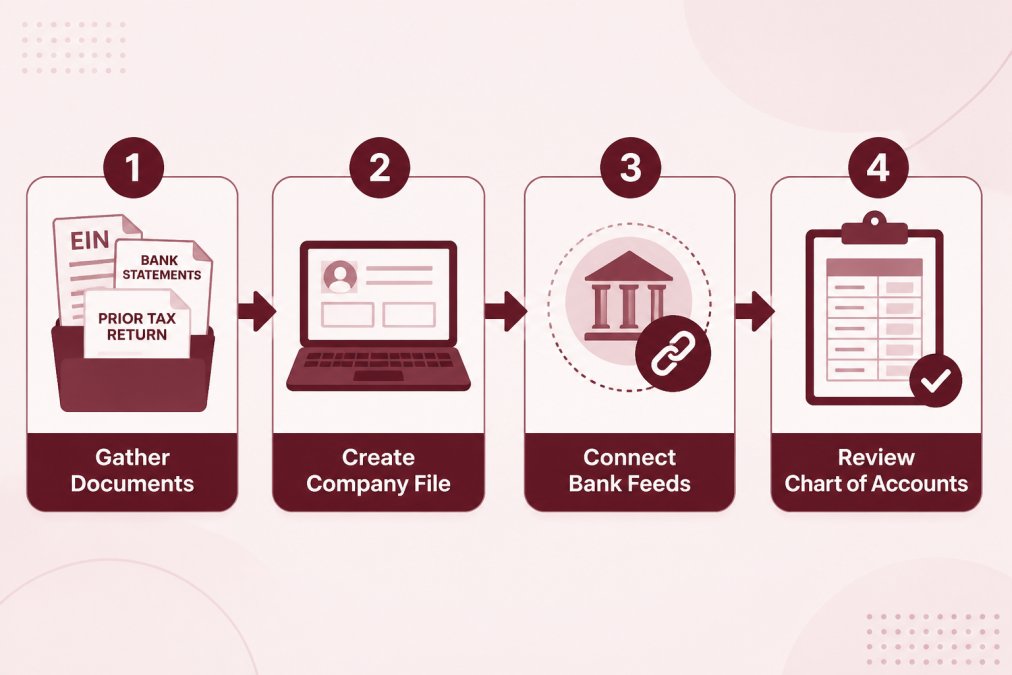
The fastest QuickBooks setup starts with paperwork, not software. Before opening a company file, collect your EIN confirmation letter, bank statements, last year's tax return, and a list of active vendors and customers. At Paldino Company CPA in Mamaroneck, this prep saves owners hours of backtracking.
QuickBooks Chart of Accounts Setup
QuickBooks chart of accounts setup organizes every category your business uses to record income, expenses, assets, and liabilities, feeding your reports and tax return. Most small businesses need 30 to 50 accounts, not the hundreds QuickBooks suggests by default.
A common mistake is leaving every default account active, which clutters reports and slows categorization. Delete what you don't need and add accounts only when a transaction demands one.
QuickBooks Tax Settings for New York Businesses
Tax configuration is state-specific: New York imposes its own corporate and sales tax rules on top of federal requirements, so your QuickBooks tax settings for New York businesses must reflect both. Set your filing entity type, enable sales tax tracking, and enter the correct rate for your jurisdiction.
For sales tax, New York State Department of Taxation and Finance guidance is the authoritative source for current rates and filing schedules. Rates vary by county, so Mamaroneck businesses may not match a rate quoted for another part of the state.
For federal questions, the EXTERNAL_LINK: IRS [Small Business and Self-Employed Tax Center | irs.gov] covers entity types, estimated payments, and deadlines. Confirm your exact rate and filing frequency with the state before you enter anything.
How to Reconcile Bank Accounts in QuickBooks
Reconciling matches your QuickBooks records against your bank statement so the two agree. Do it monthly: open the reconcile window, enter your statement ending balance and date, then check off each transaction on both.
If your books are messy, a professional can clean up errors and reconcile prior months, often faster than rebuilding from scratch.
When to Get Help With QuickBooks Setup
DIY setup works for simple, single-owner service businesses, but gets risky with payroll, inventory, multiple revenue streams, or sales tax in more than one jurisdiction, where a mistake costs more to fix than prevent.
If you're asking "who does QuickBooks setup near me," look for a firm that understands both the software and your tax picture. Paldino Company CPA works with small businesses and creatives across Westchester County, offering virtual CFO services and year-round support rather than a once-a-year filing. Joe Paldino built the practice around making financial processes clearer, not more complicated.
For a freelancer unsure about entity structure, or an agency outgrowing a part-time bookkeeper, a setup review often pays for itself in avoided cleanup.
Frequently Asked Questions
What is the first step in setting up a new QuickBooks company file?
Start by gathering your business EIN, formation documents, prior-year tax return, and recent bank and credit card statements. Then create the company file in QuickBooks Online, entering your legal business name, address, and industry. Choosing the correct industry matters because it loads a default chart of accounts tailored to your type of work, which saves cleanup later.
Do I need a CPA to help me set up my QuickBooks account?
You can complete a basic QuickBooks setup on your own, but a CPA adds value for chart of accounts design, New York tax settings, and sales tax tracking. If you are a freelancer unsure about your entity structure or a small business with employees, a one-time setup review often prevents months of miscategorized expenses and reconciliation headaches.
What are common QuickBooks setup mistakes small businesses make?
Three mistakes stand out: skipping the chart of accounts review so default categories do not match your actual expenses, ignoring New York tax settings such as sales tax and MCTMT, and connecting bank feeds without a plan for reconciliation. Each one creates cleanup work later. Spending an extra hour upfront on accounts, tax settings, and bank rules keeps your books accurate from the first month.
Getting QuickBooks right at the start saves months of correction later. Paldino Company CPA offers personalized setup guidance, chart of accounts review, and year-round support for businesses in Mamaroneck and across Westchester County. Schedule an appointment with Paldino Company CPA and start your books on solid ground.